World Cup offer: 30% off FTPSuite with code , expires June 11
FIFA World Cup 2026 · June 11 – July 19

Be the fastest
photographer
at the stadium.

104 matches. 16 stadiums. 3 countries. Every second counts. FTPush delivers your photos the instant you export, automatically, while you're already shooting the next goal.

38Days
:
00Hours
:
00Mins
:
00Secs

104 Matches to cover
48 National teams
16 Stadiums · 3 countries
<1s FTPush delivery time

Every role in the coverage chain

From the photographer on the pitch to the editor back at the newsroom. FTPSuite covers both ends.

Pitchside photographer

You're at the stadium

Export your selects to a folder. FTPush detects the file and uploads to your server automatically, while you're already shooting the next play. Works with Capture One, Lightroom and Photoshop.

FTPush Pitchside workflow guide →
Remote picture editor

You're editing remotely

FTPull watches your FTP server and downloads every new photo automatically. Files appear on your Mac as fast as the connection allows. No manual refresh, no missed shots.

FTPull Remote editor guide →

104 matches.
16 stadiums. 3 countries.
48 nations.

39 more matches than 2022. From the group stage opener on June 11 to the Final at MetLife Stadium on July 19. Every goal needs to reach editors in real time.

104Matches
48Teams
16Stadiums
3Countries
<1sFTPush delivery
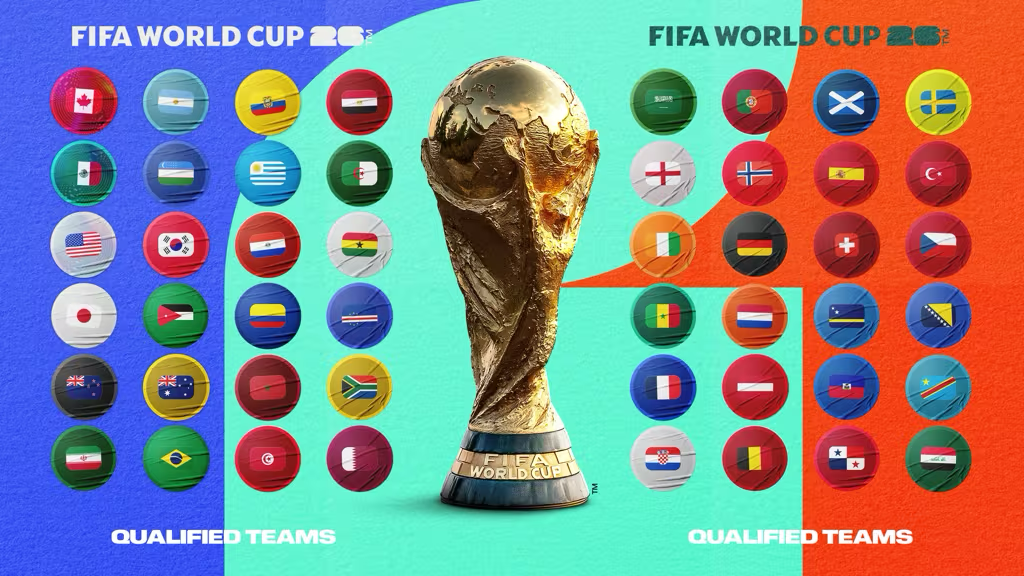
All 48 qualified nations, FIFA World Cup 2026
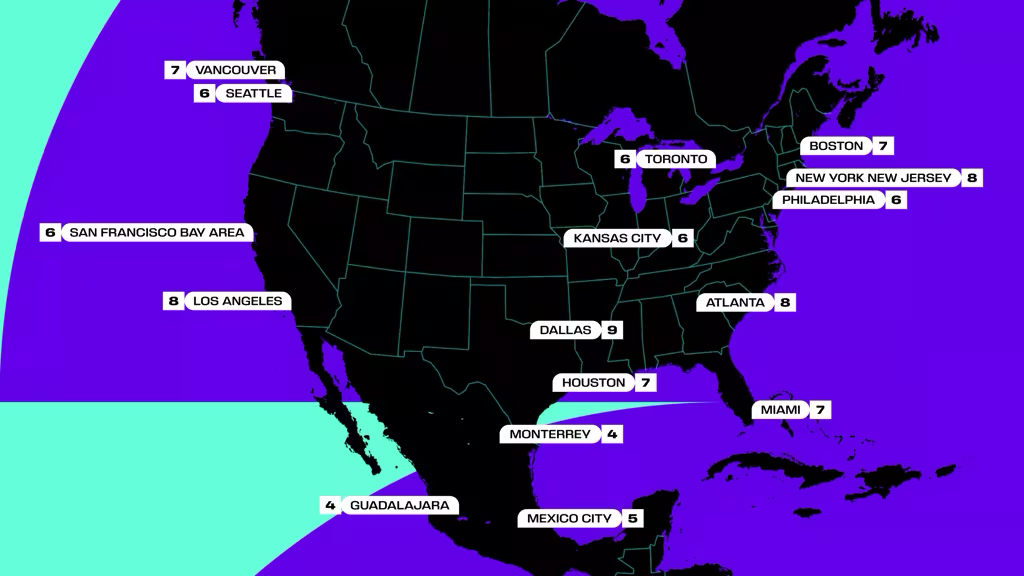
16 venues across USA, Mexico and Canada
16 Stadiums across 3 countries

USA (11 cities) · Mexico (3 cities) · Canada (2 cities). FTPush works on any network: stadium WiFi, 5G or ethernet.

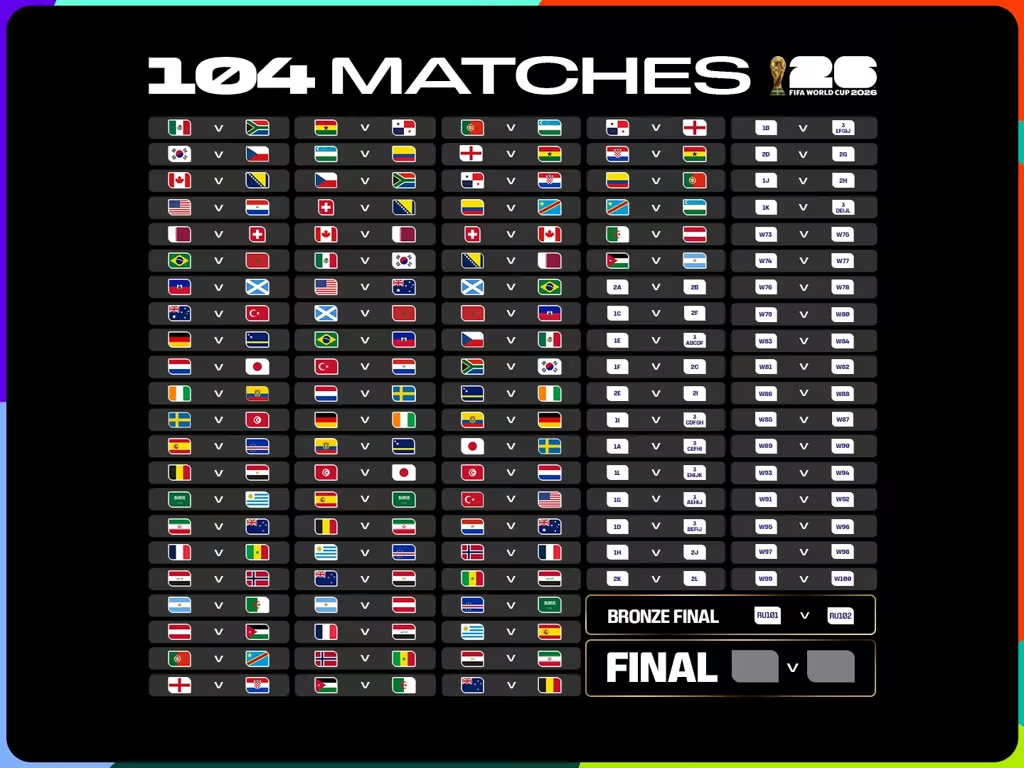
All 104 FIFA World Cup 2026 matches, full schedule
104 Matches to cover

39 more than 2022. Group stage · Round of 32 · Knockouts · Final at MetLife on July 19. Every goal needs to reach your editor in real time.

⬆ FTPush · Upload

Your photo leaves your camera — FTPush delivers it.

FTPush sits in your Mac menu bar watching a folder. The instant a new image appears (Lightroom, Capture One, Photoshop or any tool) it uploads to your server. No clicks. No switching apps. No waiting.

  • Watches any folder in real time, reacts in under 1 second
  • Works with Capture One, Lightroom Classic, Photoshop, Photo Mechanic
  • IPTC Presets: auto-inject ScorePlay keywords (sp_, opta_g) per match
  • Multiple destinations: agency, backup, client, all at once
  • FTP, SFTP, FTPS. Handles stadium WiFi and 5G hotspots
Learn about FTPush →
⬇ FTPull · Receive

Photos appear on your Mac
as fast as they're shot.

FTPull polls your FTP/SFTP server every few seconds and downloads every new file to a local folder. For remote editors covering the World Cup from the newsroom. Photos arrive automatically, no manual refresh.

  • Polls the server every few seconds (configurable interval)
  • Smart detection: only downloads complete, stable files
  • Filter by extension, folder, name pattern
  • Multiple servers simultaneously, one per photographer
  • Runs unattended: works overnight, between matches
Learn about FTPull →

30% off before
the opening match.

Get your app ready before the opening match. Use the World Cup code at checkout, valid on all plans.

Promo code WORLDCUP26

Valid on all plans · expires June 11, 2026

World Cup 2026 workflow guides

Step-by-step for every role in the coverage team, and every app you shoot with.

The Pitchside Photographer's Workflow: Deliver World Cup Photos in Real Time

How to set up FTPush at MetLife, SoFi, Azteca and all 16 stadiums, with Capture One, Lightroom or Photoshop.

Read guide →

Remote World Cup Editing: Receive Photos Automatically as They're Shot

How remote picture editors receive World Cup photos in real time with FTPull, automatically, without manual downloads.

Read guide →

Auto-Route World Cup Photos to ScorePlay with IPTC Keywords

Configure FTPush IPTC Presets to route each photo to the correct ScorePlay match collection automatically: sp_ and opta_g formats.

Read guide →

Sports Photography FTP Workflow: The Complete Guide for Mac

Everything you need to automate photo delivery from any sports event: protocols, tools, apps and folder setups explained.

Read guide →

Sports Photography FTP Workflow with Lightroom Classic

Export from Lightroom Classic and have FTPush deliver the file to your server automatically, without switching apps.

Read guide →

Sports Photography FTP Workflow: Shoot, Edit, Deliver from Capture One

Use Capture One's Export Recipes with FTPush for instant automatic delivery. The fastest tethered workflow for pitchside photographers.

Read guide →
Dedicated pages

Pricing & workflow pages for every role

Each page covers the full setup, workflow and pricing for a specific role — with a 30% off code included.

FTPush · Accredited press
World Cup Press Photographer
Pitchside, team bus, hotel — FTPush delivers to the agency FTP the moment you export.
See page → 30% off
FTPull · Photo desk
World Cup Photo Editor
FTPull downloads every RAW from agency FTP the instant it lands — editors start immediately.
See page → 30% off
FTPush · Auto-upload
Automatic FTP Upload
Send every photo to FTP/SFTP/FTPS automatically — all 104 World Cup matches.
See page → 30% off
FTPull · Auto-download
Automatic FTP Download
Pull every image from agency FTP automatically — no manual checking during the tournament.
See page → 30% off
FTPush · ScorePlay
ScorePlay Integration
Export → FTPush → ScorePlay FTP. Every image auto-delivered to your ScorePlay account.
See page → 30% off
FTPush · Getty Images
Getty Images Contributors
Getty, Reuters, AFP, AP — FTPush uploads to all agency FTPs the moment you export.
See page → 30% off

Built for every event, every league

FTPush and FTPull work year-round. Same setup, same speed, every sport.

FootballFIFA World Cup 2026 · UEFA Champions League · Premier League · La Liga · Bundesliga · Serie A · Ligue 1 · MLS · Copa Libertadores
MotorsportFormula 1 · MotoGP · WRC · IndyCar
BasketballNBA · EuroLeague · FIBA World Cup
TennisATP Tour · WTA Tour · Grand Slams · Davis Cup
American SportsNFL · MLB · NHL · NCAA
RugbyRugby World Cup · Six Nations · Super Rugby · Top 14
AthleticsOlympics · World Athletics Championships · Diamond League
CyclingTour de France · Giro d'Italia · Vuelta a España

Frequently asked questions

Does FTPush work on stadium WiFi?

Yes. FTPush works on any network: stadium WiFi, 5G hotspot, ethernet. It handles connection drops gracefully: if a transfer fails, it retries automatically. SFTP is generally more reliable than plain FTP on congested stadium networks.

How fast is delivery from the pitch?

FTPush uploads within 1 second of a file appearing in the watched folder. A 5–8 MB JPEG from a professional camera takes 1–3 seconds on a decent stadium connection. The bottleneck is always the network, never FTPush.

Can I upload to AFP, Getty and a backup simultaneously?

Yes. FTPush supports multiple simultaneous connections. You can deliver to your agency server, a personal backup and a client delivery point all at once, each with its own credentials, folder and filter rules.

What software does it work with?

Any software that exports to a folder: Capture One, Lightroom Classic, Photoshop, Photo Mechanic, and any other tool. FTPush watches the folder, it doesn't care what wrote the file.

Does WORLDCUP26 work on all plans?

Yes. 30% off FTPull, FTPush or FTPSuite: Solo, Personal or Team. Valid until June 11, 2026.

Is there a free trial?

Yes, 14 days free, no credit card required. Download FTPSuite, configure your connection and try it before the World Cup starts.